
Transfers and drivers
Hotel transfer management that links every airport run to its booking
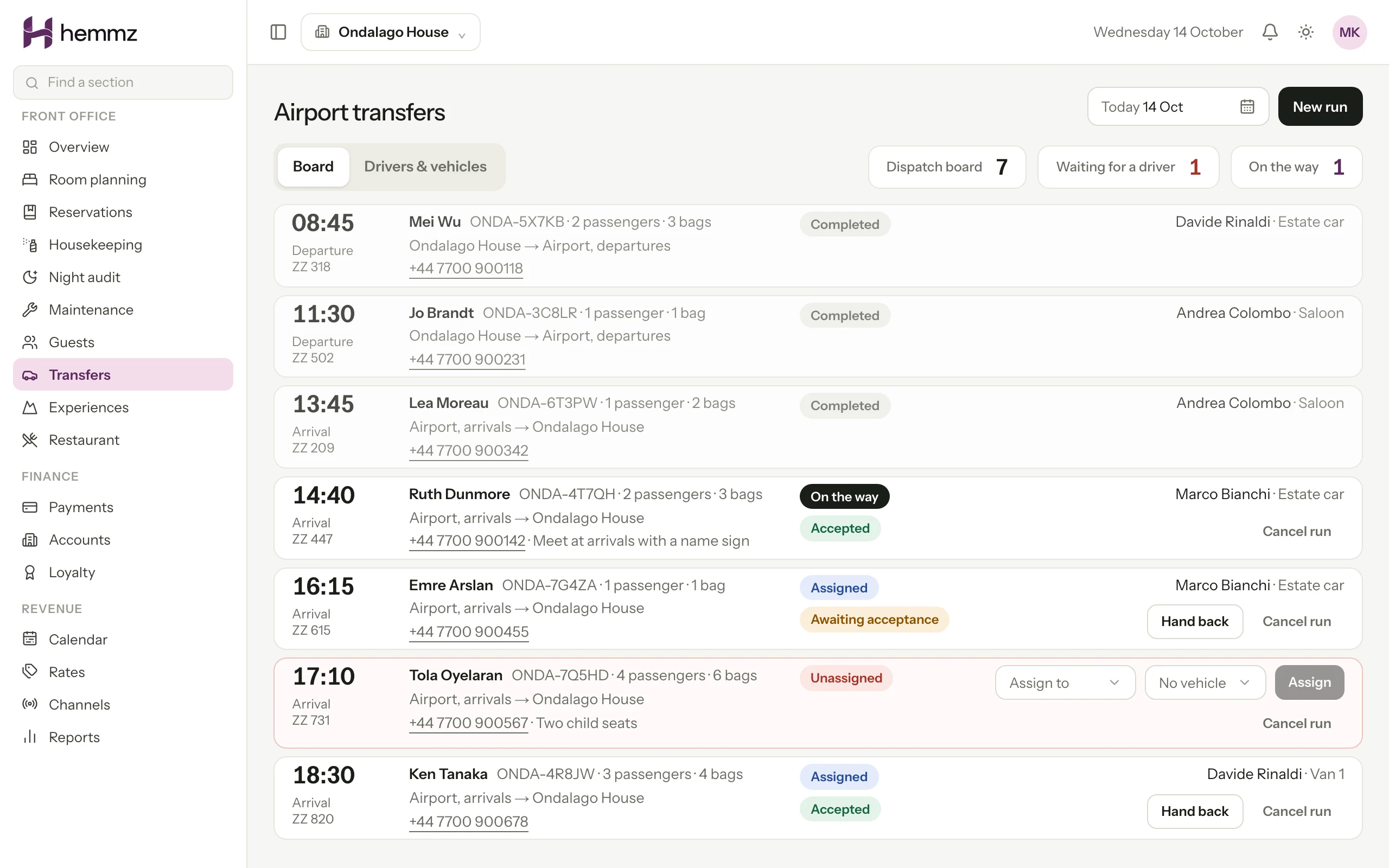
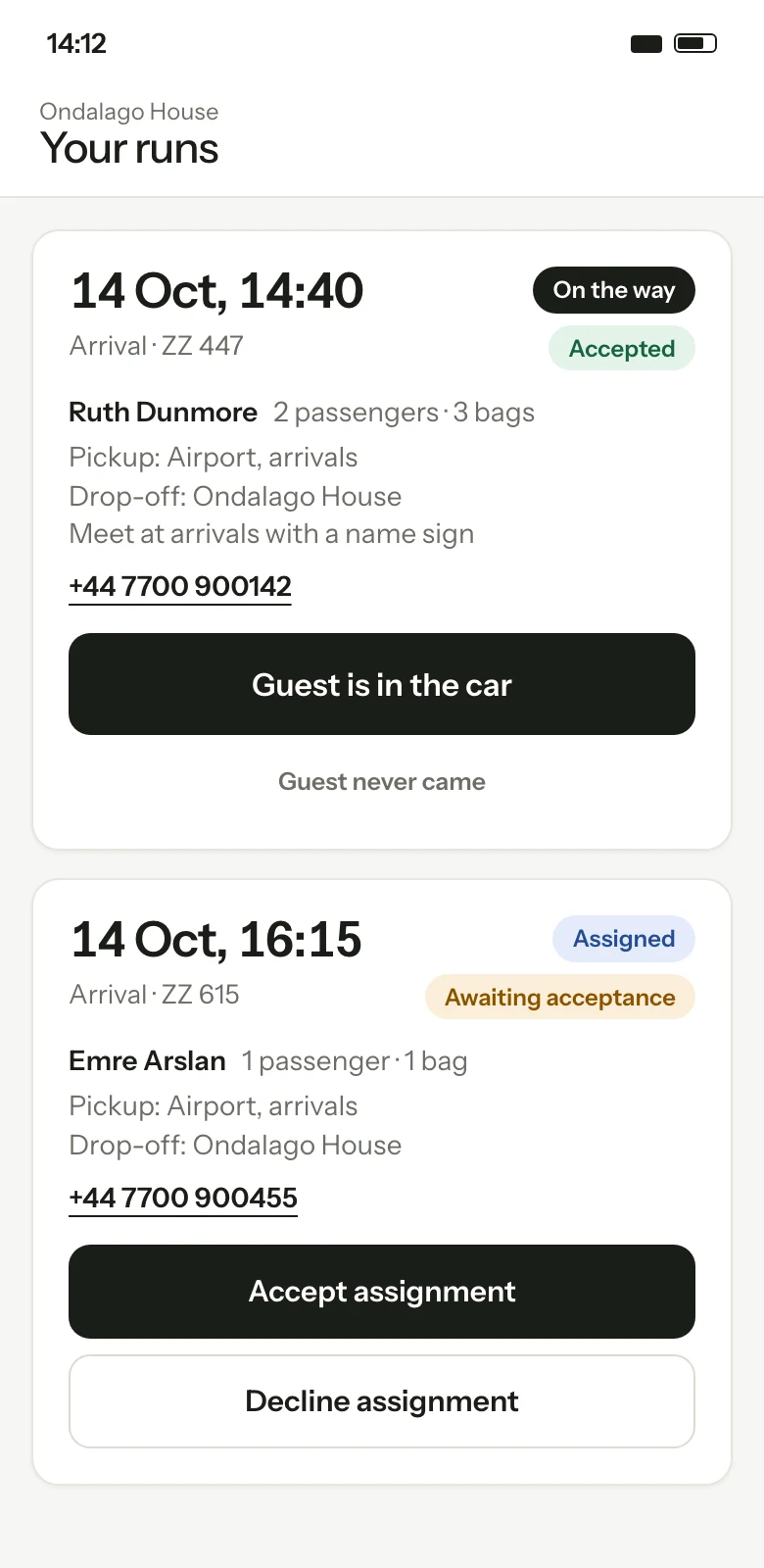
Each transfer is a run on a dispatch board with a time, a flight number, a driver and a vehicle. Drivers see their own runs on a phone, and the system refuses to put one driver on two runs that overlap.
A run is an operational record. It carries no price and does not post to the guest's bill by itself.

01
No arriving guest is forgotten
The board lists confirmed stays arriving soon that have no transfer arranged. The desk turns one into a run with a click, or leaves it because the guest is driving.
02
One driver, one run at a time
When dispatch assigns a driver who is already on a run close to that time, the assignment is refused and the clash is named. Two dispatchers choosing the same driver cannot both succeed.
03
The desk knows where the guest is
The driver taps on the way, guest in the car and dropped off. The front desk sees each step in the console, and a guest who never appeared is recorded as a no-show for that run.
The dispatch board
One property, one day, every run in time order, so the early pickup with no driver sits above last night's finished runs. A run made from a booking takes the guest's name and phone number from the reservation. A run with no booking, for a day visitor or a supplier, needs a name and a time.
- Arrival or departure, with pickup and drop-off points
- Flight number, passengers, luggage and notes for the driver
- A worklist of arriving stays that have no transfer
- Cancelling a booking cancels its runs and tells the driver
- A history of every step: who moved the run, and when
Drivers and vehicles
The roster holds each driver's name and phone number and each vehicle's label, number plate and seats. Dispatch assigns a driver and a vehicle to a run. A driver who is not currently driving, or a vehicle that is off the road, cannot be assigned.
The driver's phone view
A driver signs in and sees their own runs and nothing else in the console. Each run is a card with the time in large type, the direction, the flight number, the guest's name, the pickup point and a phone number that dials when tapped. One button offers the next step.
- Accept a run, or decline it with a reason
- I'm on the way, guest is in the car, dropped off
- Guest never came, kept apart from the main button
- Drivers report progress; they cannot cancel or reassign a run
Acceptance, reminders and changes
An assigned run waits for the driver to accept it. If there is no answer, the driver is reminded and then dispatch is alerted, at intervals each property sets. Changing the time, the flight, the pickup, the drop-off or the passenger count asks the driver to accept again. A declined run goes back to the unassigned list.
- The driver is told in the console and by email when a run is assigned, changed, taken away or cancelled
- Text messages and phone notifications where the property has them switched on
Step by step
One arrival transfer, from booking to the hotel door
01
A guest books a stay and gives an arrival time. The stay appears on the list of arrivals with no transfer.
02
The desk creates a run from it. The name and phone number come from the booking, and the desk adds the flight number and pickup point.
03
Dispatch assigns a driver and a vehicle. The driver is notified and accepts the run on a phone.
04
The flight is rescheduled. The desk edits the time and the driver is asked to accept the new one.
05
The driver taps on the way, then guest is in the car, then dropped off. The desk sees each step.
Questions
Questions hoteliers ask
Is the transfer management software available now?
It is built and available to our founding properties, who roll it out with us stage by stage. It is not offered as a self-service product. Ask for a demo and we will tell you plainly whether it fits the way your property runs transfers.
Can we charge a guest for a transfer?
A run on the board has no price and does not add anything to the guest's bill by itself. It exists so the desk can promise a car and the driver knows which guest to meet. A transfer fee is posted to the folio by the desk as a charge, like any other.
Does it follow flights automatically?
No. The flight number is written on the run so the desk and the driver can see it, but Hemmz does not read live flight data. When a flight moves, the desk edits the run and the driver is asked to accept the new time.
What can a driver see?
Their own runs: the time, the flight number, the pickup and drop-off, the guest's name and a phone number to call. A driver cannot see other drivers' runs, reservations, bills or any other part of the console.
How does the system decide a driver is busy?
No journey length is recorded, so each run is assumed to occupy its driver for an hour and a half. A second run inside that window is refused for the same driver. The margin is wide on purpose: picking another driver costs less than a guest waiting at the kerb.
Works with
Property management
The front desk, the room plan and the guest's bill in one place, from check-in to the closed day.
Read more Available to founding propertiesBooking engine
Direct bookings from your own website: rooms, packages and extras, paid online, with no commission on the booking.
Read more Available to founding propertiesHousekeeping and maintenance
A housekeeping board, a phone round for each housekeeper and maintenance work orders that decide when a room can take a guest.
Read more
See Hemmz for yourself
Tell us about your property. We will show you the platform on a call and answer plainly what is ready today and what is still coming.
Request a demo