
Housekeeping and maintenance
Housekeeping software for hotels that tells the front desk when a room is ready
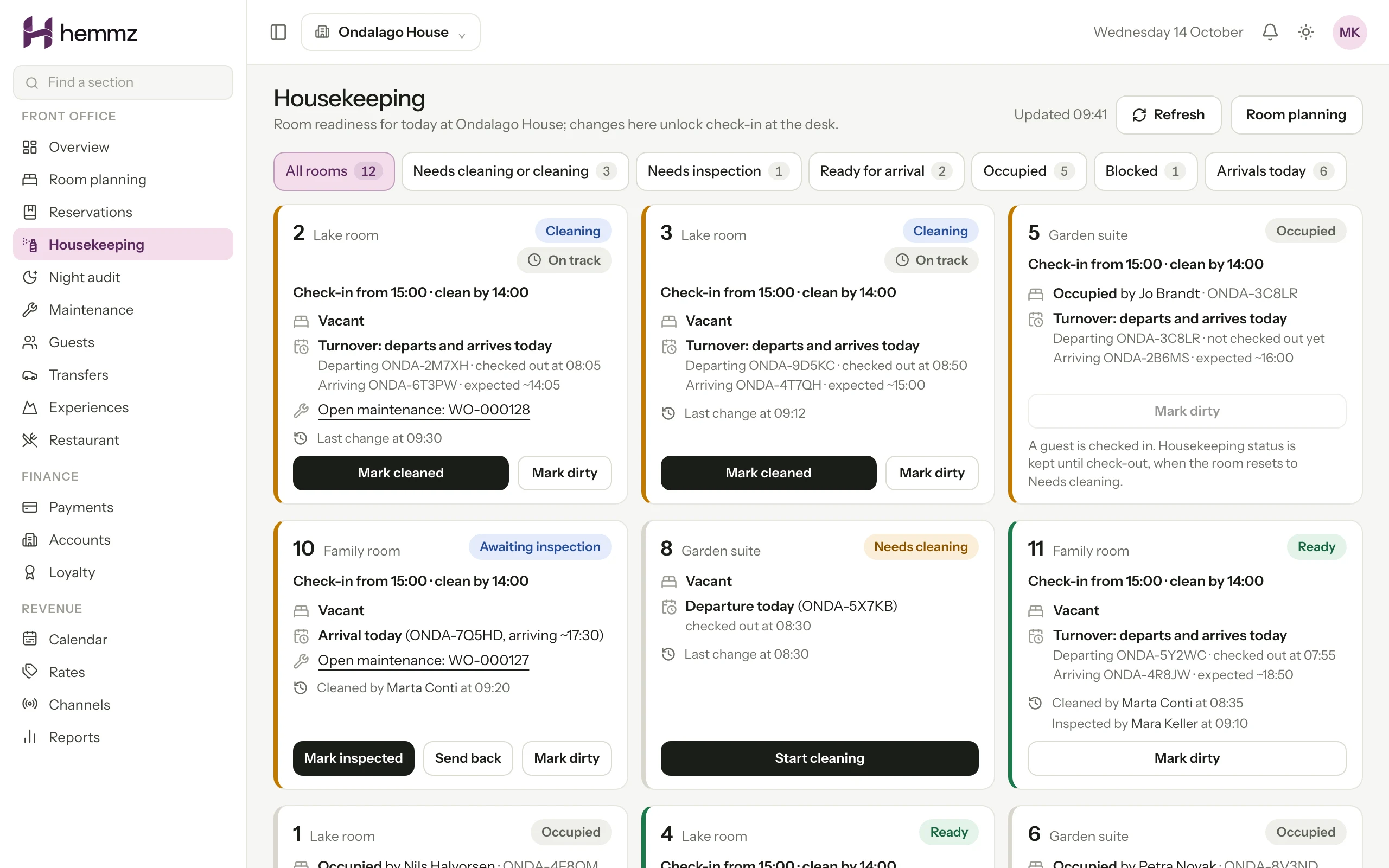
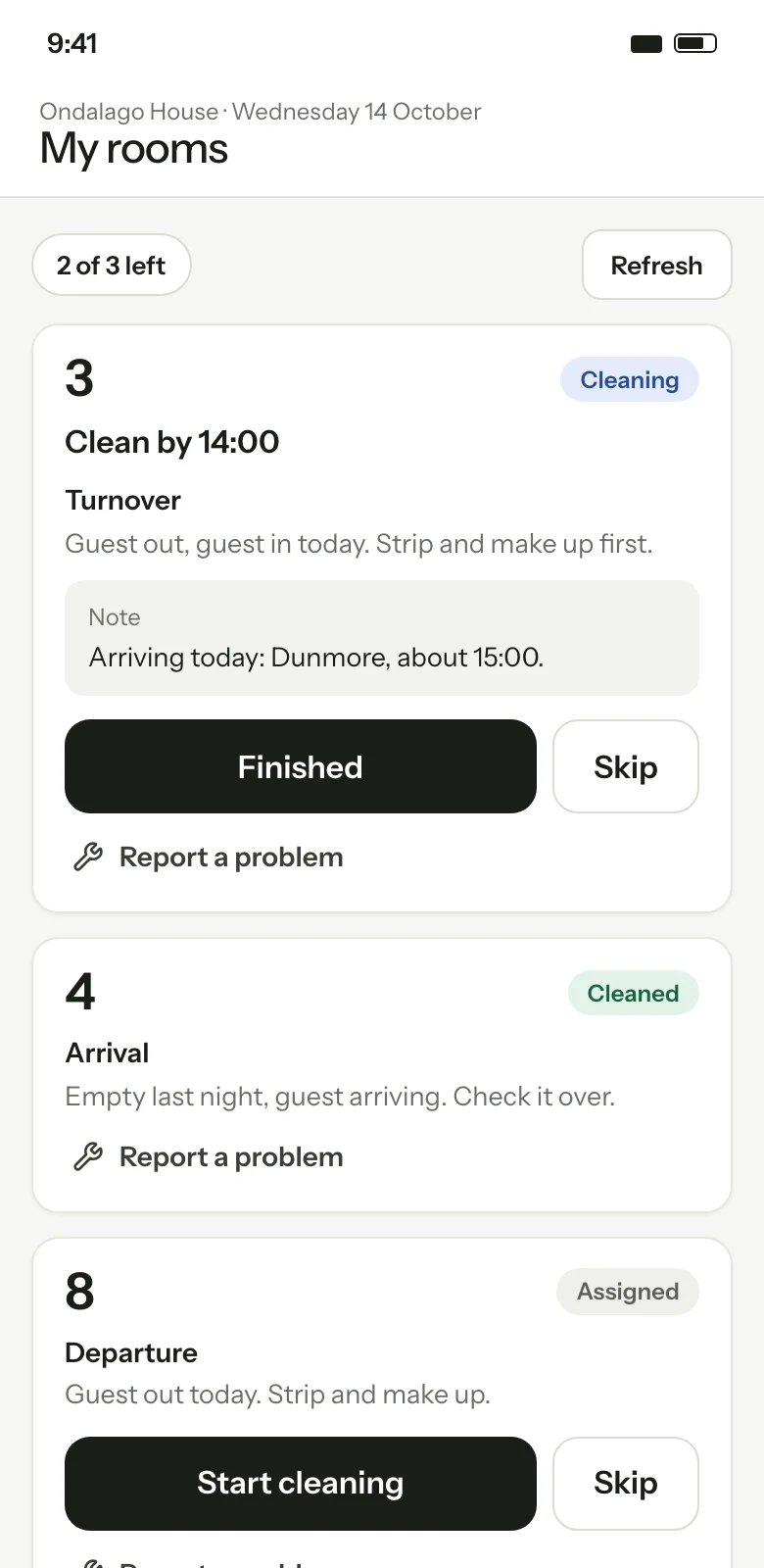
Every room moves from dirty to cleaning, cleaned, inspected and ready, and the desk cannot check a guest in until it gets there. Housekeepers work from a phone, and a fault found on the round becomes a maintenance work order with a named person and a due time.
Work orders hold a description, notes and a history. Photos, parts and recurring maintenance are not part of them.

01
No guest is sent to a room that is not ready
Check-in is refused for a room that has not been released as ready. The desk sees the reason on the reservation, and the blocker clears by itself when housekeeping releases the room.
02
The rooms with arrivals are cleaned first
Each room being prepared for an arrival has a time to be clean by and a time to be ready by. The board sorts the day around them, so a room running late is at the top, not found at the door.
03
A fault has a person and a due time
A dripping tap reported on the round becomes a work order. It is assigned, worked, checked and approved, and a room that cannot be let is held out of sale until someone clears it.
Room readiness, one step at a time
A room's state moves in a fixed order and no step can be skipped. The person who cleaned the room and the person who inspected it are recorded by name and time. The housekeeper says the room is clean. Somebody else says it is ready for a guest.
- Dirty, cleaning, cleaned, inspected, ready
- A check-out returns the room to needs cleaning at once
- An occupied room cannot be released as ready for another guest, but its stayover clean still appears on the round
- Any room can be marked dirty again, with a confirmation if work would be discarded
- An inspector can send a room back with a reason, which shows on the cleaner's round
- Two people changing the same room never overwrite each other
A housekeeper's round on a phone
Each day the cleaning tasks are drawn up from the bookings: departures, arrivals, same-day turnovers and stayovers. A supervisor puts a colleague on each room. The housekeeper opens their own round on a phone and sees a door number and what the room needs, never the guest's name.
- Start, finish or skip a task with one tap
- Report a problem from the room's card
- Paid extras due in their rooms, without prices or guest contact details
- A notice when a room is assigned to them
- Installs to the phone's home screen from the browser
Arrival deadlines
A room for today's arrival is measured against the property's check-in time, less an allowance for inspection. The board groups rooms as due soon, late, awaiting inspection, blocked and ready. For a stay in two rooms it says one of two rooms ready, so nobody reads the booking as ready too early.
- The desk can agree a different ready-by time for one stay, with a reason
- Blocked rooms say why: a late departure, a room out of order, skipped cleaning
- Alerts to the cleaner, supervisors and reception are off until the property turns them on
- A preview shows what would be sent before alerts are switched on
Maintenance work orders
A work order records what is wrong, where, how urgent it is and who has it. It is reported, assigned with a due time, started, paused while waiting for something, marked done and then approved by a supervisor, who can also send it back. Every step keeps who took it and when.
- Four priorities, from low to urgent
- Categories such as plumbing, electrical, heating and cooling, furniture and safety
- Orders for a room or for a common area of the property
- Late orders and urgent ones listed first
- Notices in the console when an order is assigned, due soon, overdue or waiting for approval
Rooms out of order
A room can be blocked for a run of nights, or held by a work order until someone clears it. Either way it cannot be assigned or checked into, and the booking engine sells one room fewer of that type on those nights. A work order's hold is refused when a guest is in the room or the night is already sold, and the screen lists the stays to move first. Putting a room back into use does not make it ready. It is cleaned and inspected like any other.
Step by step
One room, from check-out to the next arrival
01
A guest checks out of room 12. The room returns to needs cleaning straight away.
02
The supervisor's board shows room 12 as a turnover with an arrival at 15:00 and puts a housekeeper on it.
03
The housekeeper starts the task on a phone, notices a dripping tap and reports a problem from the same card.
04
The housekeeper finishes. The room shows as cleaned and waits for inspection.
05
The front desk inspects the room and releases it as ready. The arriving guest can now be checked in.
06
The tap is assigned to a colleague with a due time, fixed, and approved by a supervisor.
Questions
Questions hoteliers ask
Is the housekeeping and maintenance software available now?
It is built and available to our founding properties, who roll it out with us stage by stage. It is not offered as a self-service product. Ask for a demo and we will tell you plainly whether it fits a property like yours.
What can a housekeeper see and do?
A housekeeper has their own login and sees their own round for the day: room numbers, what each room needs and when it must be clean. They cannot open reservations, the room plan or guest details. They can clean a room, but releasing it as ready stays with the front desk, a revenue manager or the owner.
Does the housekeeping screen work offline?
No. It can be installed to a phone's home screen, but every room action needs a live connection and nothing is queued while offline. If the connection drops, the screen blocks actions until it is back, so staff never act on stale information.
Does taking a room out of order stop it being sold?
Yes. A block or a work order hold reduces the rooms on sale for that room type on the nights it covers, and the room cannot be assigned or checked into. The hold is refused if a guest is in the room or the night is already sold, and the screen lists the stays to move first.
What do maintenance work orders not cover?
An order holds a description, notes, a due time and its history. Photos, parts, recurring maintenance and logins for outside contractors are not part of work orders. Orders are assigned to your own staff with a console login.
Works with
Property management
The front desk, the room plan and the guest's bill in one place, from check-in to the closed day.
Read more Available to founding propertiesBooking engine
Direct bookings from your own website: rooms, packages and extras, paid online, with no commission on the booking.
Read more Available to founding propertiesExperiences, add-ons and loyalty
Activities, paid extras and a points programme that sit on the booking, from the guest's first search to the folio.
Read more
See Hemmz for yourself
Tell us about your property. We will show you the platform on a call and answer plainly what is ready today and what is still coming.
Request a demo