
Property management
A property management system that starts the day with what needs attention
Arrivals, departures, rooms and bills sit on one overview. The front desk sees who is coming, which room is ready and what is still owed, without opening a second system.
Built and available to founding properties, who bring it into use with us stage by stage.

01
The morning starts with a short list
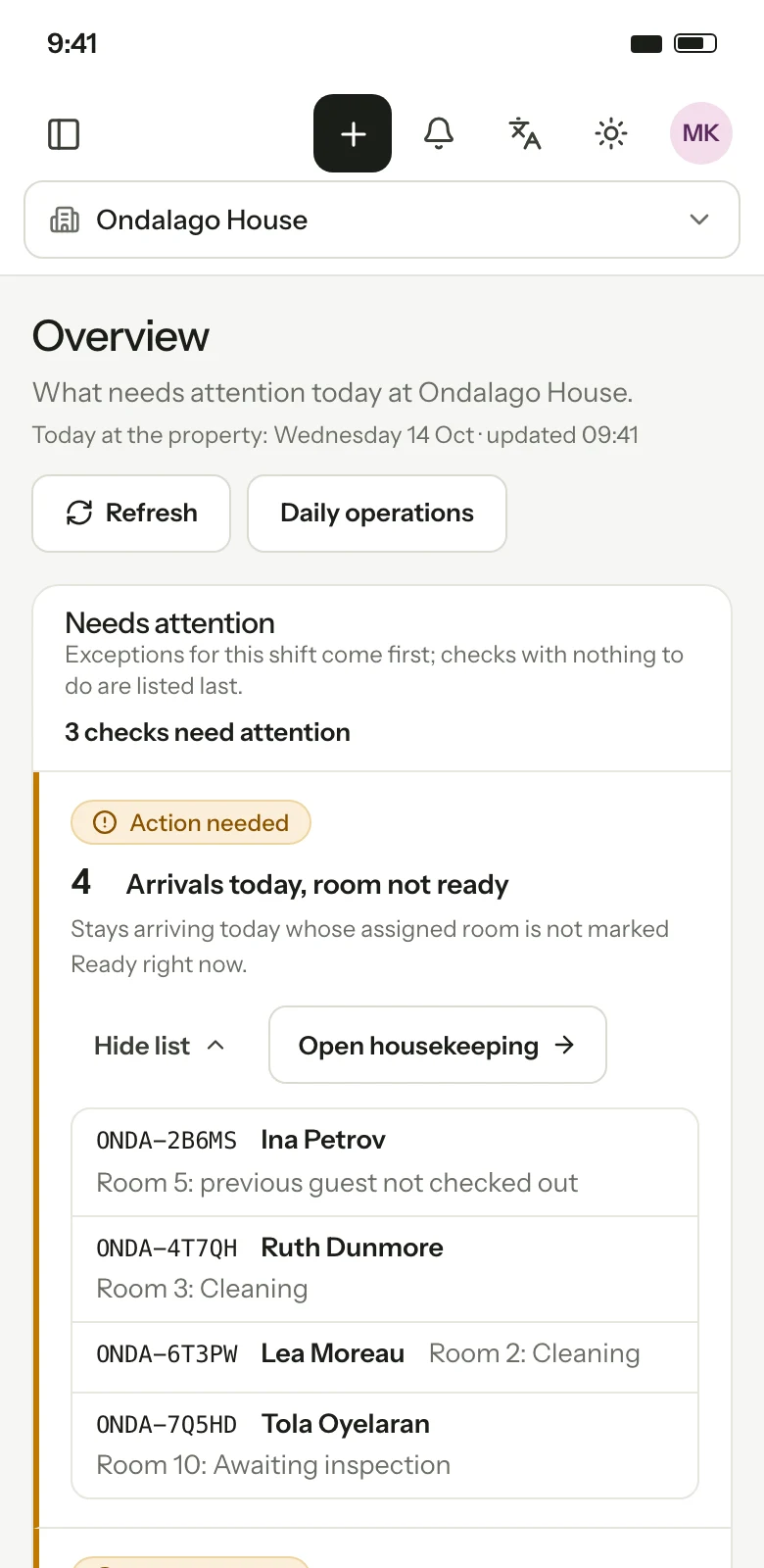
The overview shows today's exceptions first: an arrival with no room, a room not ready, a departure with money still owed. Checks with nothing to do fall to the bottom.
02
Check-in only into a ready room
A guest cannot be checked into a room that housekeeping has not released. The desk sees why, and who to ask, instead of finding out at the door.
03
A bill the guest and the accountant both accept
Every night and extra is a line on one folio with its tax. Restaurant charges (in pilot) and any transfer fee posted by the desk join them. Payments taken at the desk are recorded with how they were paid, and the day is closed so it cannot be changed later.
Front desk
Reservations made online, by phone or at the desk arrive in the same list. From one reservation the desk can assign a room, check the guest in and out, extend or shorten the stay, move rooms and record a no-show.
- Arrivals, departures and in-house lists for any date
- Room assignment with a plan across the coming weeks
- Extend, shorten or move a stay, with the price recalculated
- Late check-out fee and no-show handling
- Notes and guest profile alongside the booking
- Walk-in, phone and email bookings at the desk
Room plan
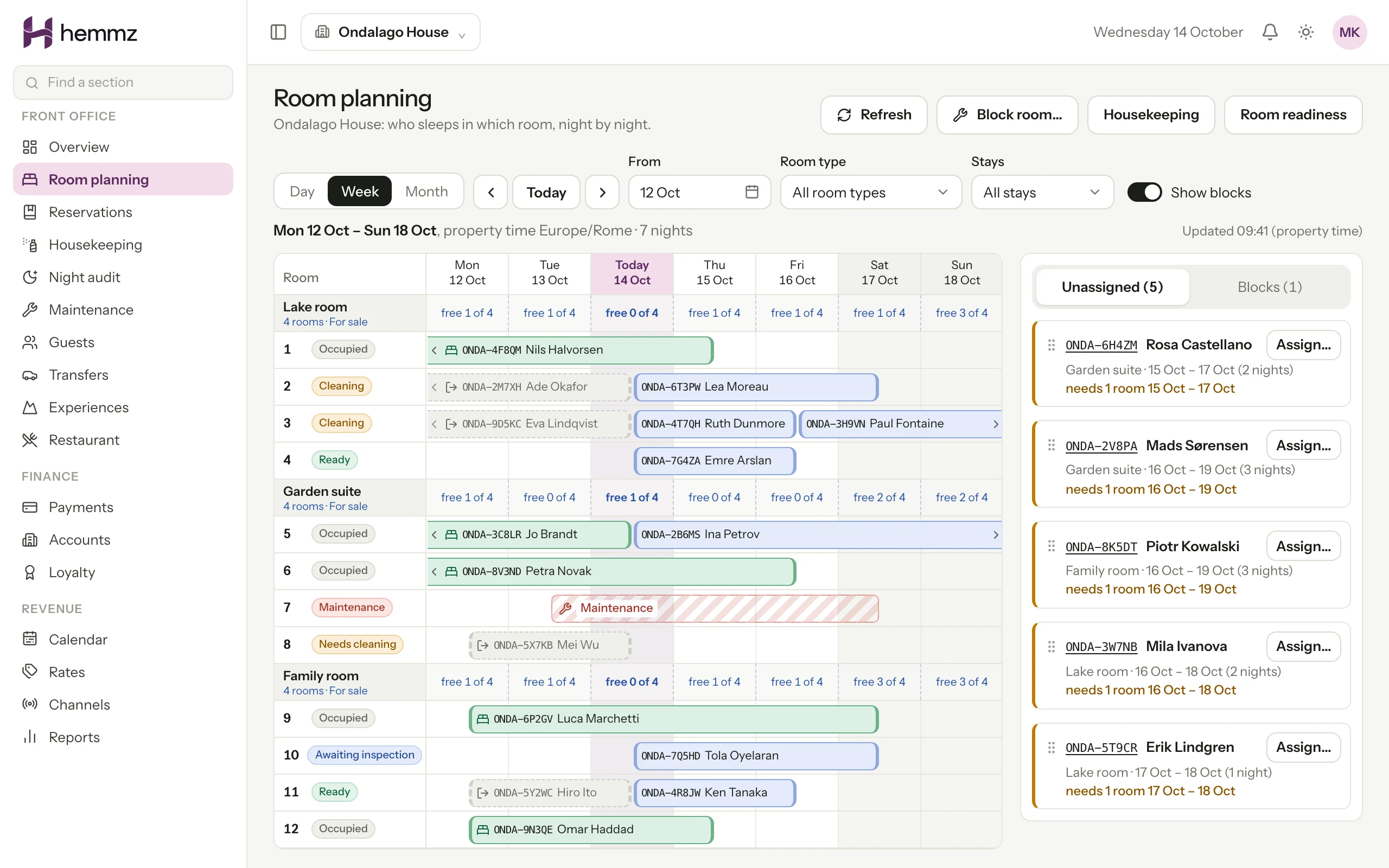
Every room and every night on one grid: who is in it, who is arriving, what is blocked for maintenance. Free rooms and rooms held for a group are counted per room type, so the desk and the booking engine sell from the same number.
Folio, payments and invoices
The folio is the guest's bill. It opens at check-in and collects the stay, anything charged to the room and anything posted by hand. Each line carries a tax class, so meals, accommodation and activities are taxed as the law requires.
- Charges posted by the desk with the right tax class
- Desk payments by cash, card terminal or bank transfer
- Invoices and credit notes numbered per property
- Stays billed to a company or agency account
- Refunds recorded against the person who approved them
Night audit and closing the day
At the end of the day the night audit lists what is still open: guests not arrived, bills not settled, payments to review. Once the day is closed its money records are sealed. A correction becomes a new entry with a name and a time, never a silent edit.
Step by step
One arrival, from booking to bill
01
A couple books two nights on the hotel's website and pays a deposit.
02
The reservation appears on tomorrow's arrivals. The desk assigns a room.
03
Housekeeping cleans the room and marks it cleaned; the desk or a manager inspects it and releases it as ready.
04
The desk checks the couple in. Their folio opens with the two nights.
05
Dinner in the restaurant, which is in pilot, is charged to the room and lands on the folio.
06
At check-out the desk takes the balance by card, sends the invoice and the room goes back to housekeeping.
Questions
Questions hoteliers ask
Is the property management system available now?
It is available to our founding properties, who are rolling it out with us stage by stage. It is not yet offered as a self-service product. If you would like to be one of the first, ask for a demo and we will tell you plainly whether it fits a property like yours.
Do we have to replace everything at once?
No. A property can start with the website and booking engine and move the front desk later, as long as we agree which system holds availability at each stage. Your current system stays in use until the replacement has been tested with your own bookings and your staff are ready.
Can staff use it on a phone?
Yes. The console works in a phone browser and can be added to the home screen. Housekeepers and drivers have their own simpler views that show only their rooms or their runs.
How does it handle tax?
Each line on a bill has a tax class, such as accommodation, meals or activities, and each class has its own rate with a start date. When a rate changes, nights before and after the change are taxed at the rate in force on that night.
Works with
Booking engine
Direct bookings from your own website: rooms, packages and extras, paid online, with no commission on the booking.
Read more Available to founding propertiesHousekeeping and maintenance
A housekeeping board, a phone round for each housekeeper and maintenance work orders that decide when a room can take a guest.
Read more In pilotRestaurant and point of sale
In pilot: tables, orders, a kitchen display and charge to room, so a guest's dinner lands on the same bill as the stay.
Read more
See Hemmz for yourself
Tell us about your property. We will show you the platform on a call and answer plainly what is ready today and what is still coming.
Request a demo